My Team page
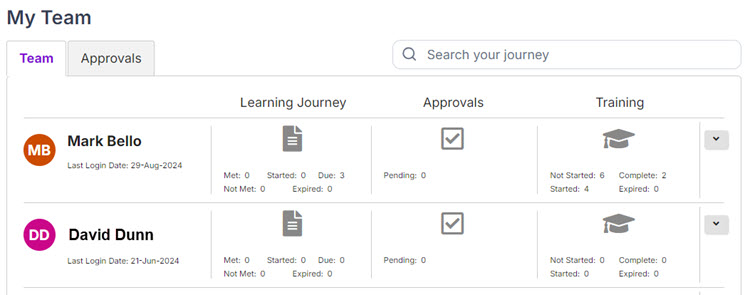
My Team page gives supervisors a snapshot view of what their team members are doing and lets them perform actions like:
- Access a team member's Learning Journey, Approvals page, Training page
- Manage registrations (add, edit, and cancel registrations)
- Approve registrations
- Add adhoc assignments
Buttons, links, and options

Click to access a team member's Learning Journey.

Click to access a team member's Approvals page.

Click to access a team member's Training page.
 (Actions)
Click to perform an action:
- Manage Registrations
- Add Registration
- Add Adhoc Assignment
- History Report
- Learning Journey Report

Click to see a direct report's downline team members.