Compose Messages with the Extension
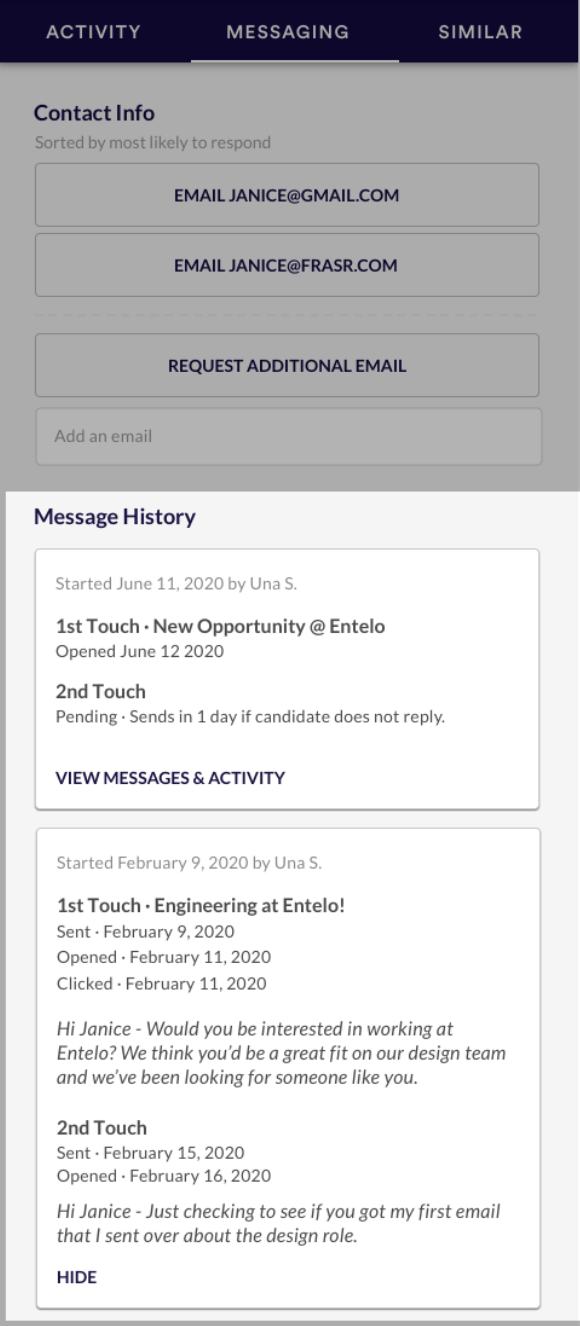
The Chrome Extension Messaging tab will allow you to access contact information and settings related to the candidate.
We want to adapt to the way that you source and not the other way around. The Chrome Extension does just that, by providing a condensed view of candidate data at your fingertips, no matter where you may be sourcing.
We wanted to make the extension even more powerful, so we are now bringing Track’s powerful messaging capabilities into the extension experience.
You can compose emails directly from the extension by clicking the "Email" button on a profile. See all the messaging history chronologically and engagement activities on the candidate Messaging tab.
It contains two sections: Contact Info and Message History.
- Contact Info will show you the candidate's contact information sorted by most likely to respond. You can request an additional e-mail address or you can add it yourself.
- Message History will show you the communications sent out to the candidate, their start date, and the sender information. If you want to view all, click on View Messages & Activity.
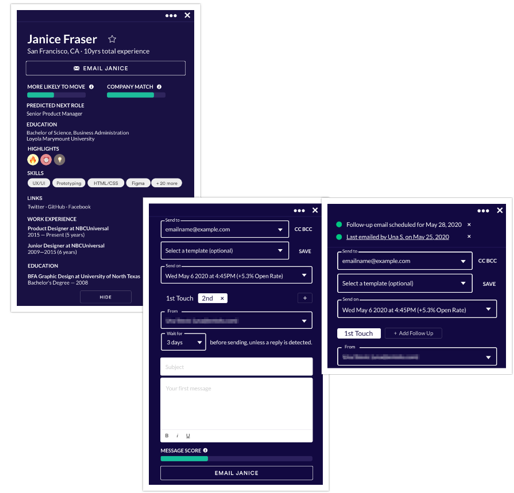
Track features like bulk messaging, outbox, editing/deleting templates, etc. still need to be accessed on entelo.com. All single-candidate compose features are supported in the extension:
- Send at Best Time
- CC/BCC
- Templates
- SOBO
- Rich text formatting
- Multiple follow-ups
- Track Lite
- Message Score & Insights
What happens if you stumble upon an already sourced profile?
Any profile that has been contacted, exported, or tagged as contacted (or inMailed) will have additional indicators and relevant information no matter which part of the extension or website you're in. You will know if an email has been sent or scheduled, and you have access to preview it. You will also know when and by whom the candidate was exported to your ATS.