Track Lite
With Track Lite, users without a Track integration can still use Track Insights to craft email messages and automatically paste them into their default email client using a mailto link. For instructions on how to change your default mail client, read this.
How do I use Track Lite?
- Click Contact on any profile. Assuming that you do not have a Track Integration, you will see the Track Lite modal, where you can draft your message using our data-driven insights. You can also create or use templates from here.
- When you’re finished, click Finalize Draft. When you do this, the system loads relevant data on the backend, such as custom fields, into your email. You will notice that this changes the button to Copy and Launch, which indicates that your message is now ready for use.
- Once the draft is ready, click Copy and Launch and Track Lite populates the subject, the recipient email, and any BCC/CC addresses from the modal into your email client via a mailto link. As for the body of the message, it will automatically be copied to your clipboard at the same time, so just click paste directly into your email client body.
Copy and pasting the body
Copy and pasting method allows you to compose more robust emails with HTML features (formatted text, images, and embedded links) that would not be supported with a basic mailto method. To access these features, check the toolbar at the bottom of the modal body section. Additionally, this solution circumvents any mailto character limits.
Viewing email addresses
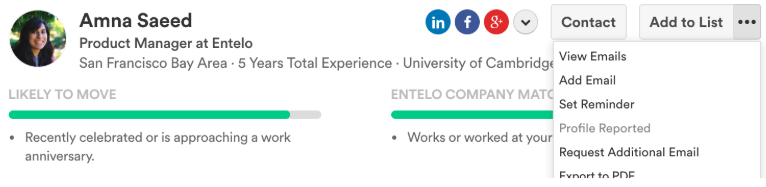
You can view emails from the To section of Track Lite modal, or from the three dots on Profile. If that candidate does not have an email, you will see Request Email instead of Contact.
Viewing templates
Click the Track tab in the navigation bar.
Bulk contact
No, you can only use this for one profile at a time.
Changing your default mail client
Yes. You can follow the steps in this article.
Track Lite and reporting
If you mark a profile as contacted, they will count towards "contacted" in team activity in reports.
Track Lite supported browsers
Track Lite is supported on Google Chrome and Microsoft Edge. It is not supported on Windows Internet Explorer.