Scheduling: "Neutral Account" Disconnected Alert
Why should I read these instructions?
If you are a user of the CIQ Automated Scheduling solution and your company has connected their Exchange or Office365 calendars with Convey and:
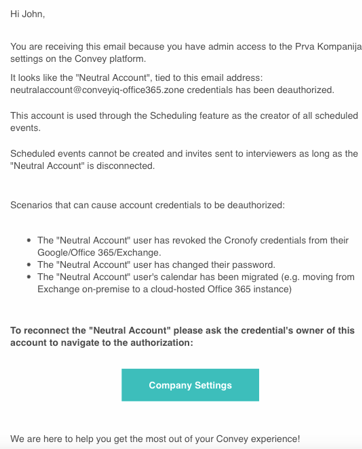
- You have received an email from CIQ with subject line: Scheduling - Neutral Account Disconnected:
- And / or you or your team have noticed that even though the scheduling flow and availability calculations from within the Convey Scheduling solution work, the events are not being created in the interviewer's calendars.
What is a "Neutral Account" and why do I need to know about it?
Convey continuously checks if the Scheduling ‘Neutral Account’ profile calendar access authorization is connected successfully.
The purpose of the ‘Neutral Account’:
- It is a dummy account that your Office or Exchange IT Admin had created for the purpose of completing the onboarding CIQ Scheduling setup process.
- The account is not tied to a physical person.
- The account is used as an overall "organizer" of all events scheduled throughout the Scheduling CIQ solution.
- As such, the account plays the key connection for Convey to create, update, and delete events. Only when events are created in this calendar, the participants like interviewers will be successfully invited to the event and will see a copy of the event in their calendars too.
- If the Neutral Account is not connected or the connection is revoked at any point, that means Convey will not be able to continue to create, update and delete scheduled events.
Why does a "Neutral Account" disconnect without a user doing it on purpose?
A calendar profile like the one used for the ‘Neutral Account’ can be disconnected for many reasons, it simply means that the credentials we hold against your calendar provider to access the data have stopped working.
Example scenarios include:
- the IT admin has revoked the Cronofy credentials from their Office 365/etc account
- the calendar account password has changed
- the calendar account has been migrated (e.g. moving from Exchange on-premise to a cloud-hosted Office 365 instance)
What will these instructions help me resolve?
These instructions are meant to help guide the calendar IT administrator to resolve the disruptions faced with the Neutral Account being disconnected for any reason.
To the person that has access to the ‘Neutral Account’ credentials:
You will also need Company Admin permissions for the Convey platform.
- Please make sure to follow the ‘Company Settings’ button from the received email explained at the beginning of this article OR navigate directly to the ‘Company Settings’ page in the Convey platform, and expand the ‘Calendar Authorization' section.
- You should see a message in red, indicating that the Neutral Account has been disconnected.
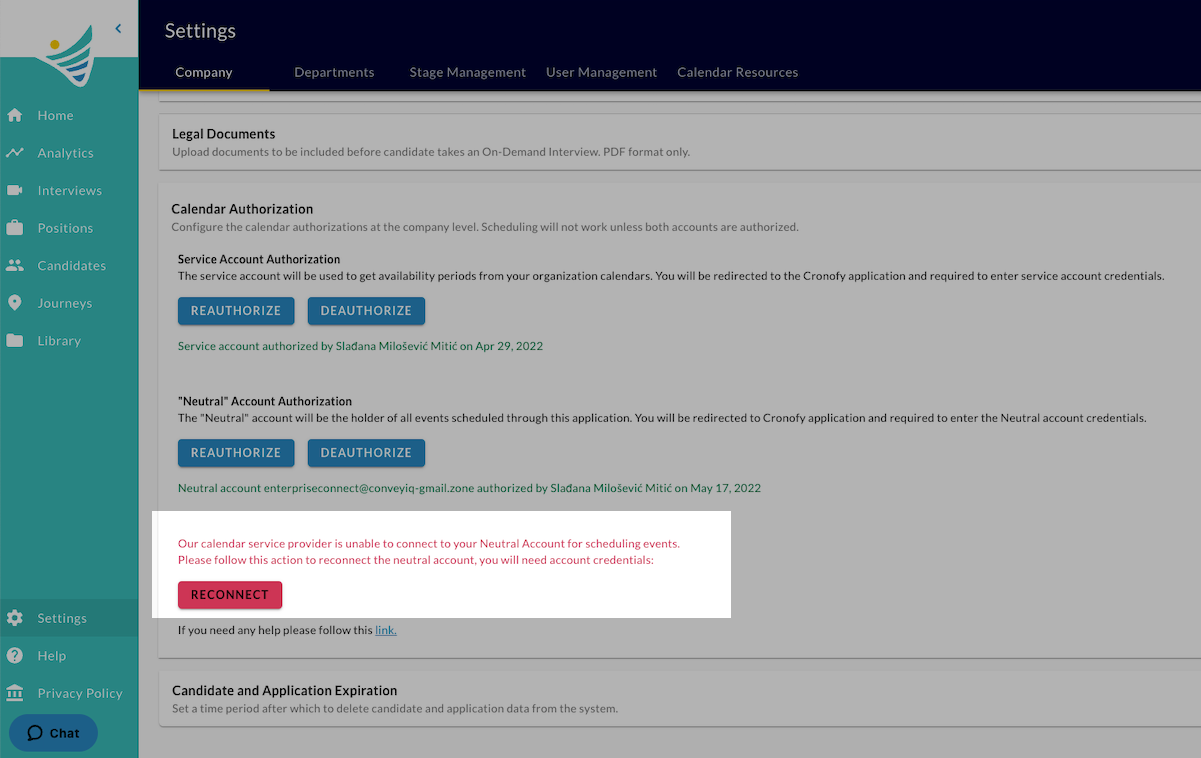
- Click the ‘Reconnect’ button.
- You should be redirected to the Cronofy authorization flow.
- Complete the authorization flow until the end.
You should be all set, and the Neutral Account authorized again.
To double check, you can navigate back to the ConveyIQ Company Settings page. Now you should not see the message in red.
What would happen if there were scheduled events by recruiters and candidates while the neutral account was not connected?
Once the Neutral Account calendar connection is established again, all the events in queue to be created in the calendar will be automatically created.