Taking The Interview from a Smartphone
To take the interview on your smartphone*, you will need to be on the latest version of iOS (iPhone) or if you're on an Android, you will need to be on version 7.0 or newer.
For supported internet browser version specifications and more information on supported devices for ConveyIQ, please follow the chart below.
Supported browser and operating system for ConveyIQ Digital Interviewing Platform (desktop and mobile)
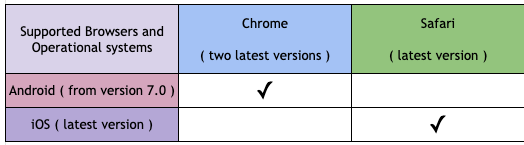
Note: Make sure you are using the supported version of your device's operating system and one of the supported browsers (make sure it is updated) from the charts above.
If it's the first time you are accessing a particular position, click on the invitation link located within the body of your employer’s email. You will be directed to the interview setup page from which you can start your interview.
*The ConveyIQ Questionnaire is designed and optimized for smartphones, not tablets.