Understanding Scheduling Events
What is a Scheduling Instance (Event)?
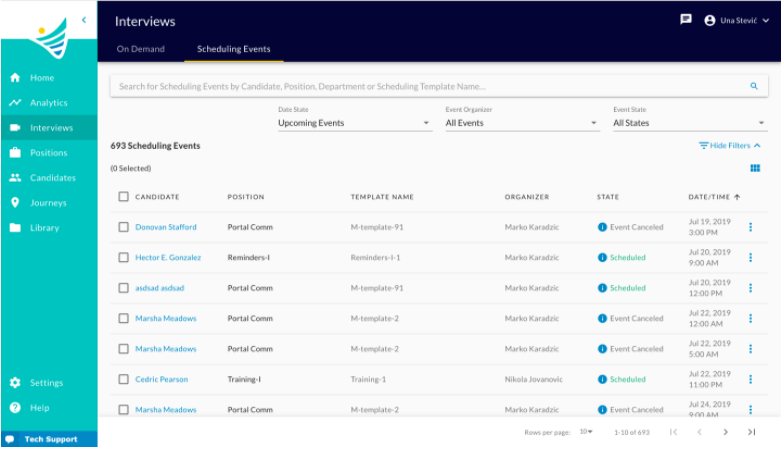
The Scheduling Events tab, under the Interviews page, lists all the Scheduling Instances ever created in the company.
Any candidate in the system can be invited to schedule an interview (event), based on the candidate's Job Application and Scheduling Template definition a Scheduling Instance will be created.
From there on the instance will be visible in the Scheduling Events Pool and recruiters will be able to track its updates and changes through states as well as manage it.
Permissions to Access the Page
A user needs to have Department level permissions for all, for one or for a particular set of departments.
The permissions are View and Manage and are contained in the 'Read Only', 'Reviewer' and 'Creator & Reviewer' permission groups as illustrated here.
Relation to the Scheduling module explained here.
Search
The user can use the search field to narrow down the list of results or to search for a specific interview. The search will return results for the following criteria: Candidate Name, Position Name, Department Name or Scheduling Template Name.
Filters
User can filter down the Scheduling Instances by:
- Date State -defaultsto Upcoming Events.
- Event Organizer -defaults to all events by any Organizer.
- Event State -defaults to all states.
Filter by Date State:
- Upcoming Events- shows all events from the current date to the future.
- All Events- shows all events that exist no matter the date.
Filter by Organizer:
- My Events- shows all the events where I am the organizer.
- All Events- show all events no matter who is the organizer.
Filter by Event State:
- All States- show all events no matter their state
- Scheduling Requested- show all events in Scheduling Requested state
- Scheduling In Progress- show all events in Scheduling In Progress state
- Scheduled- Show all scheduled events
- Request Canceled- Show all events in Request Scheduled state
- Event Canceled- Show all events that are Scheduled
Actions
The user can perform certain actions upon the Scheduling Event depending on its State. Different actions are available with single selection or bulk selection.