Imports List page
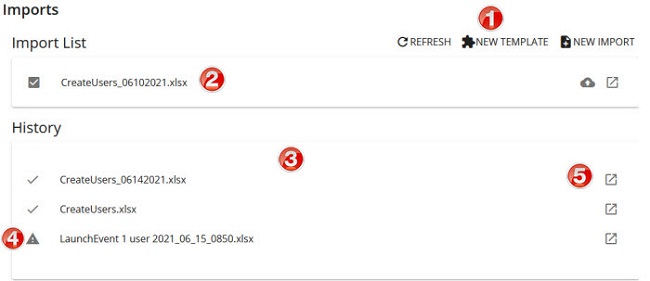
From the Imports List page in Rival Workflow, you can:
- Start bulk imports
- Track the progress of imports
- Review the details of imports (including errors)
Here are some key parts of the page.
| Name | Description | |
|---|---|---|
| 1 | Action buttons | Click to a button to perform an action:
|
| 2 | Active (in progress) import panel | Shows active, in-progress imports. |
| 3 | History panel | Shows import history. Imports are shown here for 30 days and then drop off. |
| 4 | Alerts | Shows whether imports successfully completed or partially completed with errors.
|
| 5 | Details | Shows details of the import file including list of records and status (Complete or Error). |
 : Import completed with errors. (Typically means some records processed and others did not.)
 : Import completed with no errors.