ROSI Access, Roles, and Enablement
ROSI availability and capabilities in Workflow are controlled by your organization’s configuration and team-based privileges.
In practice, ROSI access is managed in two layers: first, ROSI must be enabled for the relevant portal experience; second, user access depends on whether the user has standard ROSI access or the ROSI Admin User privilege.
ROSI access levels
- ROSI Admin User – Users with this privilege can retrieve admin-level Workflow information, such as other employees’ tasks, events, profile details, and documents, based on their existing permissions.
- Standard access (default) – All other users receive standard ROSI access when the feature is enabled. Standard users can use ROSI for product guidance and to access their own workflow information, but they do not have admin-level ROSI access.
ROSI does not override your security model. All responses respect existing role-based permissions and data segmentation.
Enable ROSI
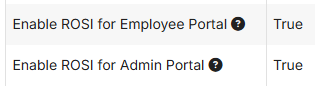
ROSI can be enabled separately for the Admin Portal and Employee Portal experiences.
- Go to Administration > Settings > UI.
- Click Edit.
- Set the applicable ROSI setting or settings to True.
- Save your changes.
To support controlled rollouts, ROSI for the Employee Portal may be disabled by default in some environments.
Configure ROSI Admin access
ROSI Admin access is not assigned to any team by default. To grant ROSI Admin capabilities, assign the ROSI Admin User privilege to one or more teams.
- Go to Administration > Teams.
- Open the team you want to update, or create a new team.
- In the team’s Privileges section, add the ROSI Admin User privilege.
- Review team members to confirm the intended users have access.
- Click Save.
Once assigned, members of that team can use ROSI Admin capabilities immediately, as long as ROSI is enabled for the Admin Portal.
Recommended setup: To keep ROSI Admin access clear and auditable, consider creating a dedicated team for ROSI Admin users, such as ROSI Admins, HR Systems Admins, or Workflow Admins.