Forms Report
Key info
- Use search filters to get the data you want
- You must be on a team with the Manage Forms privilege to run this report. This privilege lets you access every form in the system (and possibly confidential information).
- You can run for a specific Form or all Forms.
- Default date range is a one-day range between To and From. Change to get a suitable date range.
- Date options include: Form Completion Date
Report results (PDF, XML, Excel)
Form_Name, Employee Name, Date_Complete, ObjectId, Form_TaskID, UserEventID, Form Type, EmployeeEmail, EmployeeConnect_ID, EmployeeHRISID, LoginID, Event Status, Event Type
Good to know
- Drill down on Form Name to view Form
- If employee opted out, Form is not viewable
Report results (Excel Form Data)
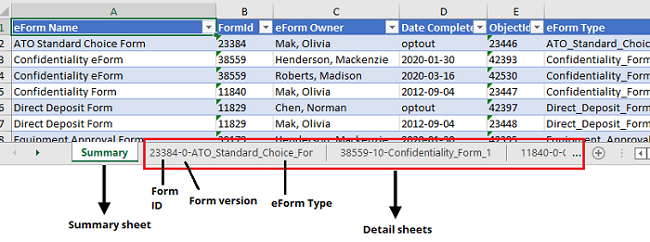
Form data can be exported into a Microsoft Excel workbook. The workbook contains a Summary sheet showing: Form_Name, FormID, Form Owner, Date Completed, Object ID, Form Type, Employee Email, Authorization Parameter CFG, HRISID, Login ID, Event Status
The workbook also contains detail sheets for each Form in the download. These sheets contain Form data for the specific Form. Naming convention for detail sheets is FormID-FormVersion-FormType so you can easily identify which sheets contain which data. Example: 38559-10-Confidentiality_Form
Forms Report
The Forms Report provides data on form completion and status.
Run Form Reports
- From the navigation bar, click Reports > Forms Report.
- (If applicable) Click a link to view a Form.
Download Form Reports
- From the navigation bar, click Reports > Forms Report.
- Click Download and select an output file format:
- XML: Results are generated in an xml file available to view or save.
- Excel: Results are generated and Microsoft Excel is launched to open or save.
- Excel - Form Data: Results are generated and Microsoft Excel workbook is launched to open or save.
- PDF: Results are generated in a pdf file available to view or save.