Legacy eForm Builder
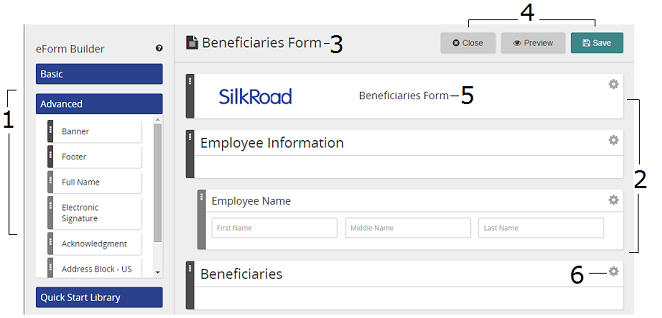
Legacy eForm Builder is a tool you can use to create your own Forms. It's a WYSIWYG tool, and you drag and drop elements (and arrange them) to create a Form.
Here are some Form Builder features.
| Description | |
|---|---|
| 1 | Elements are listed here—under Basic or Advanced sections. Drag them to the right to add to the Form. Tip: Quick Start Library contains pre-configured element sets to jump start building a Form. |
| 2 | Your "canvas" where elements are dropped, arranged, and edited |
| 3 | Form header |
| 4 | Close: Closes the Form Builder. Before closing, you are prompted to save. Save: Saves your work. If any fields are not fully configured, you must deal with them before you can save your Form. Preview: Saves your Form and opens a preview in a new browser window. These options are available in preview mode:
|
| 5 | This is the Form display name, which you can change. Display name shows in Form lists, task instructions, and Form Report. |
| 6 | Click the gear icon to set/edit element properties |