Configure a preferred name search field
A new feature is now available: preferred name search! There are a few setup steps your system administrator does to get this going. After that, you can search for employees by preferred name.
Step 1: Create a label for the search field
- From the navigation bar, click Administration>Settings.
- Click the Employees tab.
- Scroll down to the Search_Field Label setting.
- Click Edit.
- Enter a label name, for example, Preferred Name.
- Click Save.
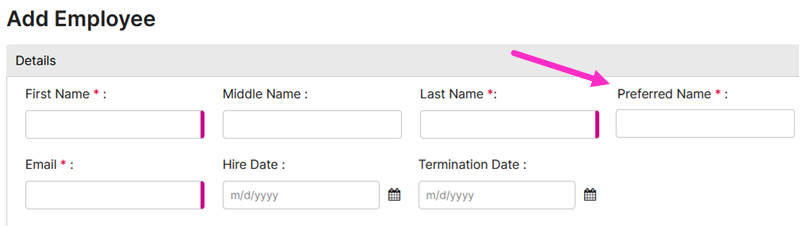
The Preferred Name field is now available when you add or edit an employee:
Step 2: Set the search field to be required (Optional)
- If you want the search field to be required when you create or edit an employee, follow the steps in this task. Otherwise, skip the steps in this task to leave the search field as not required.
- From the navigation bar, click Administration>Settings.
- Click the Employees tab.
- Scroll down to the Search_Field is Required setting.
- Click Edit.
- Move the toggle to Yes.
- Click Save.