Employees
SSO Authentication Parameter Label
The display label for the Single Sign On identifier within the user interface. The field references the SSOAuthParam node when access is via any API. The SSO Authentication Parameter is required when using another system to provide authentication for users of this application. When used, this value must be unique and can be used to identify users for API methods that operate on a user.
Default value: SSO ID
Employee HRISID Label
The display label for the Employee HRIS ID within the user interface. If the text of this label is removed then the Employee HRIS ID field is not displayed in the UI. This impacts create/edit employees, searching for employees, and the column in the employee list results.
The field this display references is the EmployeeHRISID node when access is via any of the API. The Employee HRISID can be required. When used this value must be unique and can be used to identify users for API methods that operate on a user.
Default value: Employee ID
Employee HRISID is Required
Force the Employee HRIS ID to be required when creating or editing a user in this application. Applies to all employees when created or edited in the UI or API.
Default value: No
Options: Yes or No
Employee Email Address Requirements
Force the Employee Email address to be required when creating or editing a user in this application. This applies to all employees when created or edited in the UI or API.
Default value: Yes
Options: Yes or No
Default Login ID Format
Sets the default Login ID format.
Default value: Firstname.Lastname
Options: Firstname.Lastname, Email, None.
Tip: None means there is no default Login ID format.
Work Phone Label
Set the label for the Work Phone field.
Default value: Work Phone
Mobile Phone Label
Set the label for the Mobile Phone field.
Default value: Mobile Phone
Default User Key Category
The default category to use for user key properties filtering.
Category to Limit User Management
AbstractCategoryID that will be used to filter on who can manage users.
User Management Team
RoleID to manage users
Name Format
Format used to display a name when a single name is presented such as Employee Profile, Task Assignment, Shared Dashboards and notes.
Default value: %FIRST_NAME% %MIDDLE_INITIAL% %LAST_NAME%
Options: %FIRST_NAME% %MIDDLE_NAME% %MIDDLE_INITIAL% %LAST_NAME%
Name Format for Lists
Format used to display names when there is a list of employees such as search results and reports.
Default value: %LAST_NAME%, %FIRST_NAME% %MIDDLE_INITIAL%
Options: %FIRST_NAME% %MIDDLE_NAME% %MIDDLE_INITIAL% %LAST_NAME%
Alternate Employee Key
The EUP field to display in user lists.
Pending Users Name Format
Format used to display names of pending employees.
Tip: Updating the pending user name format will not change the format of previously uploaded employees.
Default value: %FIRST_NAME% %LAST_NAME% (%EMAIL%)
Options: %FIRST_NAME% %MIDDLE_NAME% %LAST_NAME% %EMAIL% %SSOAUTHPARAM% %EMPLOYEE_HRISID% %HIRE_DT% %LOGINID%
Category To Limit View Others Tasks
AbstractCategoryID that will be used to filter on what events and tasks a user can see. Works with the ViewOthersTasks privilege.
Exclude people pickers from data segmentation rules
When set to Yes, people pickers are excluded from data segmentation. This lets you search for people outside of your assignment categories—while still maintaining data segmentation everywhere else. This impacts launching event, selecting people, event edit, reassigning tasks, key properties, and shared dashboard pickers. It does not impact quick search, selecting an employee for an event, and reports: Form and Audit.
Default value: No
Warning Multiplier
Set the Warning Multiplier
Default value: 100
Secret Question EUP Field Name
EUP Var Name for Authentication Secret Question
Only set the secret question the first time
Non-zero to allow the value to be set if has not been previously set. Updates not allowed.
Default value: 0
Make Termination Date Optional
Make termination date optional when Workflow Manages I-9 Compliance setting is set to False.
Default value: False
Enable Employee Purging
Turn on employee purging functionality, which allows privileged users to purge employees from the system.
Default value: Off
Include Audit Notes when purging user
When set to True, the user name is not preserved in the audit notes when user is purged from the system. User name is replaced in the audit notes by the purged user nomenclature so that the user is no longer identifiable by name.
When set to False, the user's name is preserved in the audit notes when a user is purged from the system.
Default value: False
Minimum Password Length
The minimum number of characters allowed in a user's password
Default value:4
Password Security Level
Enforces increasingly secure rules on a password
Default value: Level 1: Password can't match Login ID.
Remove Employee_HRISID when purging
Controls whether employee HRISID is purged during a GDPR employee purge.
Default value: False
Options: False or True
Enable Imports
Controls whether the bulk import functionality is enabled and available from the navigation bar.
Default value: Off
Options: Off or On
Note: After this functionality is turned on, it takes 24 hours for imports to sync data.
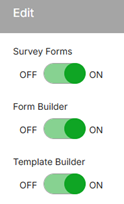
Survey, Form, and Template Builder
Controls whether the Survey Forms, Form Builder, and Template Builder features are on or off.
Toggle on or off the Survey Forms, Form Builder, and Template Builder features.
Default value: Off
Options: Off or On
Note: This setting is not available unless there is a value in the Survey Forms URL setting (not visible to client administrators). (Rival staff provide a value for the Survey Forms URL setting.)
Note: Dynamic Templates are enabled by default. To toggle off, simply click the option. This change will take place overnight. After disabling the feature, the Dynamic Templates tab will no longer be visible under Forms, and the option to add Dynamic Templates to Event tasks will be removed.
Search_Field Label
Controls the label for the search field in the Employee Details section of the employee profile.
Example: If you want to capture an employee's preferred name, make the field label Preferred Name.
Default value: No Value Set
Search_Field is Required
Controls whether the Search_Field is required when creating or editing an employee.
Default value: No