Sync Students from Workflow
When Rival Workflow is linked to Rival Learn, a sync button on the Students page enables admins to import new and updated User Profiles from Workflow into Learn.
When admins click ‘Sync’, new and updated user data from Workflow will be imported. These user records will show at the top of the list with tags ‘New’ or "Updated’. Additional information can be added or edited in the existing Student Properties window.
Next to the Sync button, "Last synced" tells users how long ago and by whom the last sync was performed.
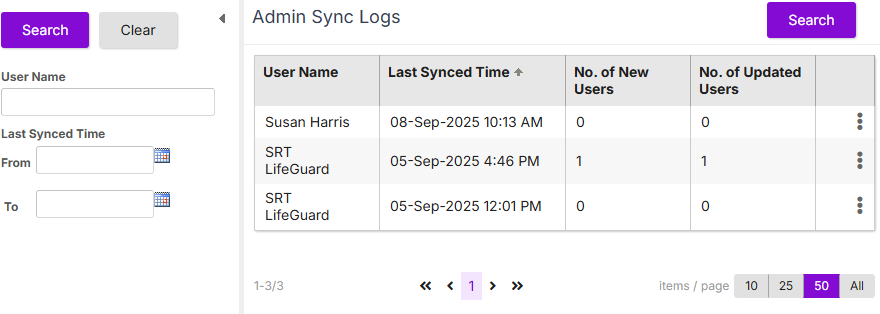
For transparency and accountability, an Admin Sync Log shows the admin user names and date/time of sync, along with number of New Users and Updated Users. Click ‘Search’ to show records. Note: Sync actions cannot be undone, but the Admin Sync Log provides a record for transparency.
Reconcile User Profiles
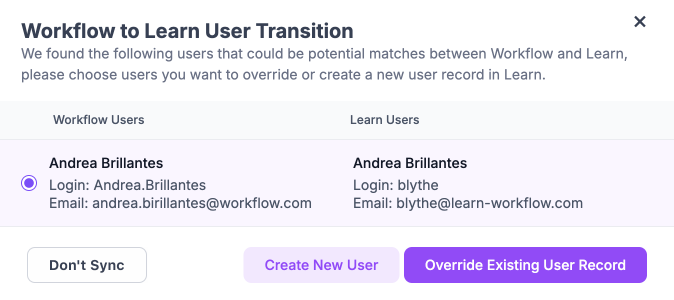
When syncing users from Workflow to Learn, profiles are matched by name, login, and email. Sometimes a Workflow user may share only some of these details with an existing Learn user. If this happens, a modal will appear so you can choose whether to:
- Merge – Override the Learn user profile with Workflow information.
- Create New – Add the Workflow user as a new profile in Learn.
- Keep Separate – Do not sync this Workflow user to Learn.
How it works
API calls (GetUserIDList and GetUserProfileEx2) are made to pull the following data from Workflow. No changes are made in Workflow.
- Student profile: Title, first name, middle name, last name, full name, email, employee ID, position number, position title, reports to position, start date, termination date, company name, address, city, zip/postal code, email, phone, cellular, pager, work phone, fax, birthdate, gender, company contact name, company address, company city, company zip/postal code, company phone, company fax, company email, company taxpayer identification number
- Language settings: preferred language, correspondence preference (email, phone…etc), Email format
- Position setting: Position title, number and report to position (if available)
- Personal Address setting: country, state/province
Syncing is by batch (40 users at a time). The Reconcile User Profile modal has a scroll bar to handle any number of user matches.
The Sync feature flag is controlled by SuperAdmins: Enterprise > Configuration: "Workflow to Learn User Transition" (1 = ON).