Training Event Properties page
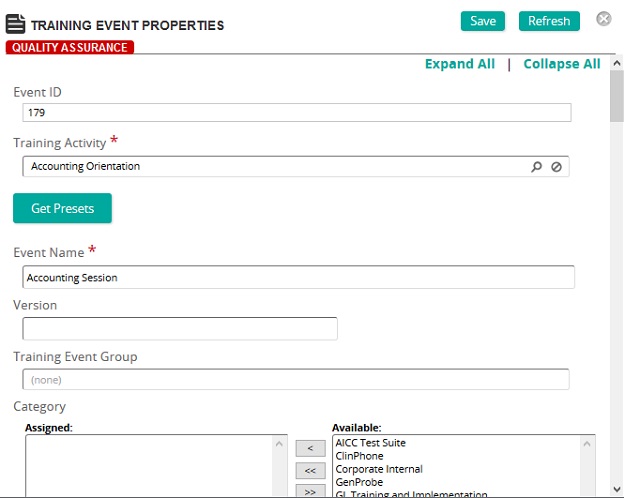
On the Training Event Properties page, you can create a training event or modify an existing one.
Fields
Training Activity: Click  to search for and select a training activity.
Note: Linking to a training activity automatically loads the presets for the activity into the event. To restore any preset values from the linked activity, click Get Presets.
Event Name: Type the training event name.
Version: The version is inherited from the training activity. This version is attached to all student records created for the event.
Categories: To assign categories, click a category or categories from the Available list and use the arrow buttons to move them to the Assigned list.
Associated Survey: If applicable, associate a survey to the training event. Associating a survey is used for reporting purposes only. Survey data must be entered manually using the survey assess function.
Schedule
Location & Contact Information
Enrollments
Notes: Type any pertinent information about the event. Maximum number of characters you can type here is 5000 characters.
Syllabus Notes: Syllabus Notes are an outline of the subjects and topics covered in a training event. It gives students a quick look at the structure of an event. Type syllabus notes in this field.