Training Event Group Properties page
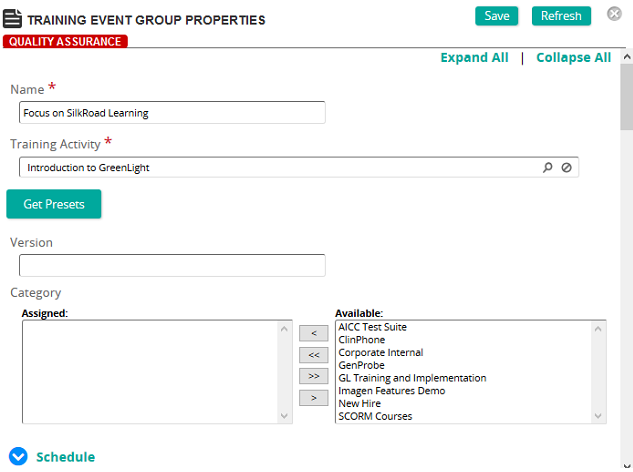
On the Training Event Group Properties page, you can create a training event group or modify an existing one.
Fields
Training Activity: Click  to search for and select a training activity.
Note: Linking to a training activity automatically loads the presets for the activity into the event group. To restore any preset values from the linked activity, click Get Presets.
Version: The version is inherited from the training activity. This version is attached to all student records created for the event.
Categories: To assign categories, click a category or categories from the Available list and use the arrow buttons to move them to the Assigned list.
Schedule
Vendor: Click to search for and select a vendor from the Vendors page.
Associated Survey: If applicable, associate a survey to the training event. Associating a survey is used for reporting purposes only. Survey data must be entered manually using the survey assess function.
Administrator Name: Type the name of the course administrator.
Administrator Email: Type the email of the course administrator.
Training Events Contact: Click Add to search for and select a contact or contacts for this training event. If the training event is part of a training event group, then the Training Event Contacts list is the list of all contacts for all events in the group. This contact list is the recipient list for TE Notifications if the notification is active. Contacts MUST be defined as a Rival Learn Administrator user to be available as a training event contact.
Training Locations: Click Add to search for and select a training location or locations.
Enrollments
Notes: Type any pertinent information about the event.
Syllabus Notes: Type information for the syllabus. This appears in the Course Catalog Item.