Equipment Properties page
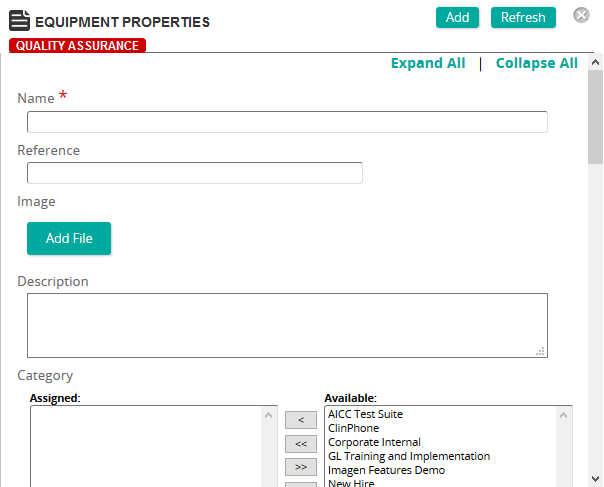
On this page, you define properties for the equipment.
Fields
Name: Type a name the equipment.
Reference: Type a reference for this item to make it easier to find in searches.
Image: To include an image of the equipment, click Add File to upload an image. A progress bar shows the progress of the image upload. Once uploaded, a thumbnail image and file size are shown along with a Delete button.
Description: Type a description for the equipment.
Categories: To assign categories, click a category or categories from the Available list and use the arrow buttons to move them to the Assigned list.
Venue: Select the location where the equipment is to be used.
Serial Number: Type the equipment's serial number for tracking purposes.
Status: Select a status to indicate whether equipment is Active or Inactive.
Service Status: Select a status to indicate whether the equipment is usable (in service) or out of service (out for repair).
Contact Information: Type any contact information for the equipment.
Notification Email: Type a notification email address.
Equipment Location: Type a location where the equipment is stored or located.
Shipping Instructions: If shipping instructions are required for the equipment, provide them.
Cost: If there is a cost for the equipment, enter it.
Per: Select the cost unit, either Per Day or Per Hour.
Purchase Date: Click in the box or the calendar icon to select the date the equipment was purchased.
Notes: Type any free text notes about the equipment.
Scheduling