eCourse Assessments page
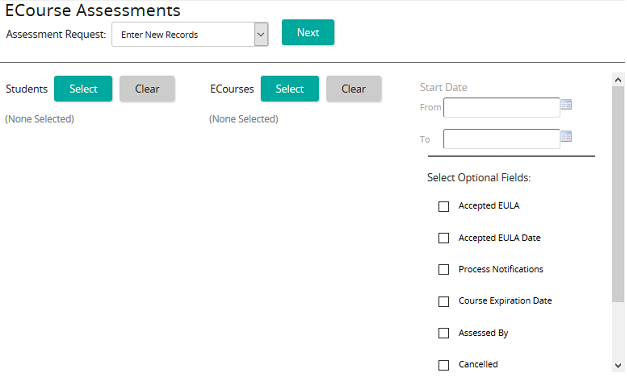
On the eCourse Assessments page, an administrator can:
- Enter a new eCourse record
- Edit an existing eCourse record
- Delete an eCourse record
The most typical task an administrator performs from this page is marking an eCourse complete.
Fields
Assessment Request: Select one of the following:Enter New RecordsEdit Existing RecordsDelete Existing Records
- Assessment Request: Select one of the following:Enter New RecordsEdit Existing RecordsDelete Existing Records
Students: Click Select to access the Students page where you can search for and select students. Click Clear to remove the selected students from the list.
ECourses: Click Select to access the ECourses page where you can search for and select eCourses. Click Clear to remove the selected eCourses from the list.
Start Date: To specify a from and to date range, click the calendar pop-up to select dates. (Only available when editing or deleting existing records.)
Select Optional Fields: Select any check boxes that may apply.