Important definitions
Learning content can be created and added to Rival Learn in several ways and many instructional designers use third party authoring tools to create online courses. Rival Learn can import any course created by a third party authoring tool, as long as the files are published to SCORM or AICC standards.
SCORM file
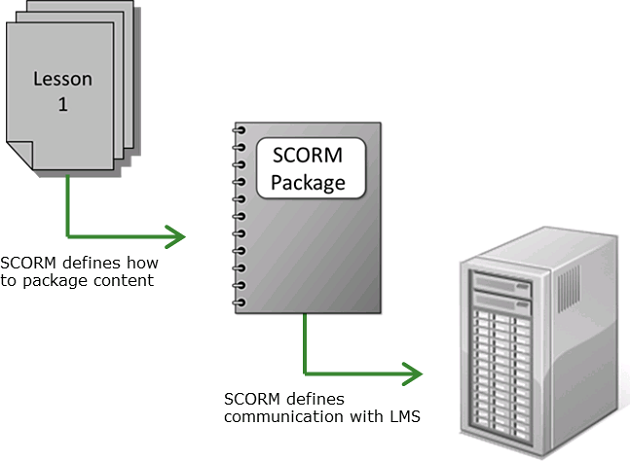
The Sharable Content Object Reference Model or SCORM is a collection of standards and specifications used for web-based e-learning. SCORM ensures that content can be created, launched, and tracked using any tools or learning management systems that are compliant with these standards and specifications.
AICC standards accomplish the same goals as SCORM. The Aviation Industry Computer-Based Training Committee (AICC) is an international association of technology-based training professionals. The AICC develops guidelines for aviation industry in the development, delivery, and evaluation of CBT, WBT, and related training technologies.
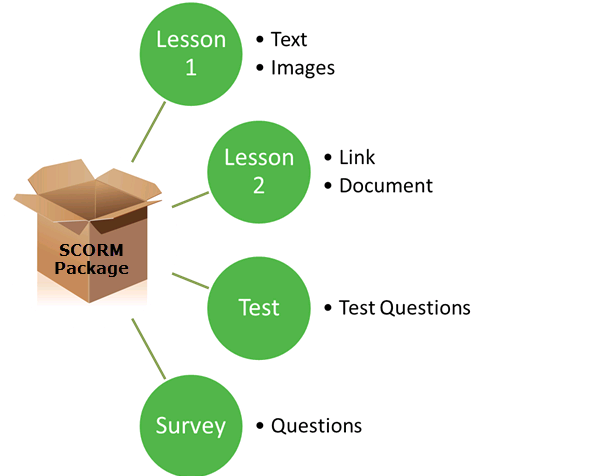
When a course is published, typically, the authoring tool creates a SCORM package or zip file. This package (file) contains the content and instructions for viewing and tracking the course in the system. The following image displays the various pieces of content that can be contained within a SCORM package.
Content object
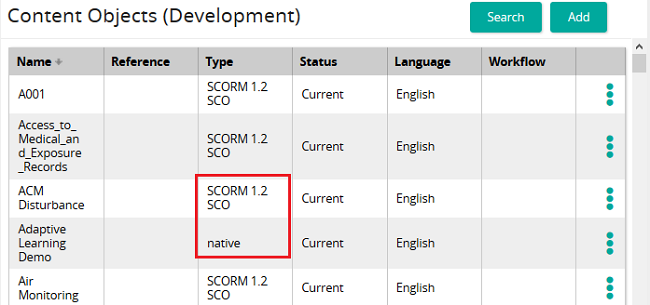
When a SCORM zip file is imported, Rival Learn creates two content objects. A content object is a named piece of content that can be handled as a single unit. A content object can reference a file (e.g. an image, stylesheet, etc.) or a block of text (HTML, plain text, CSS). The first content object, referred to as the native content object can be authored. The second, referred to as the SCO, cannot be authored.