Certification Type Properties page
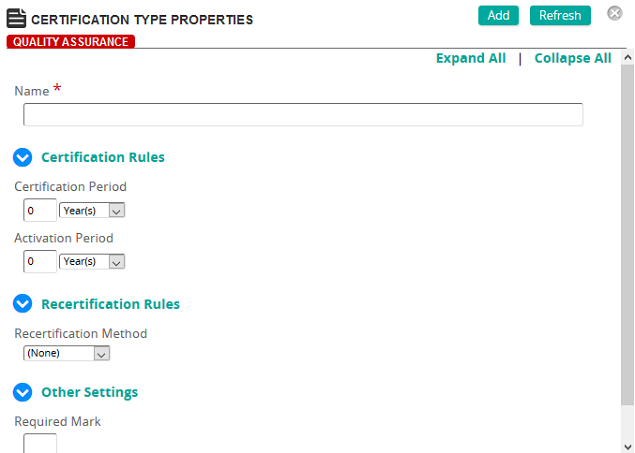
On the Certification Type Properties page, an administrator defines the properties for a certification.
Fields
Name: Type a name for the certification type.
Certification Rules
Certification Period: To define a certification, enter a value (in days or months). The default value is set to 0 (zero). Enter a value in this field if students are required to successfully complete the content (or competency or requirement) within the certification time period entered from the student’s membership date. For example, if users are required to complete specific content within the first 6 months from membership start, enter 6 months here.
Note: Defining the certification period and recertification period as zero (0) means the learning journey is required but no time limits for obtaining certification are required.
Activation Period: The amount of time prior to certification expiration when a learning journey certification (requirement, competency, eCourse, training activity, exam, or assignment) will appear in the My Training page for the student. Enter a value (in days, months, or years) to set this time period.
Note: The default value is set to 0 (zero). This results in the content appearing on the My Training Page immediately.
Recertification Rules
Recertification Method: Select one of the following options:
Recertification Period: Enter a value to require users to renew current certifications. For example, if users are to renew a certification every two years, enter 2 and select Years from the drop-down box.
Reactivation Period: This is the time before recertification expiration when learning journey content (eCourse, training activity, exam, or assignment) will appear in the My Training page for the student. Enter a value (in days, months, or years) to set this time period.
Based Due Date: (Fixed Period selected): Click to select a date from the calendar pop-up. See Fixed Period recertification example for details.
Other Settings
Required Mark: The mark required to meet the condition for the learning journey. This mark overrides any company default mastery setting. If you do not enter a value here, the company default is used.
Content recovered from the legacy Help Center on 2026-09-14 and not yet reviewed against the current product. Source: https://srt-learning-help.silkroad.com/#/home/18487/en/std