Create Job Posting page
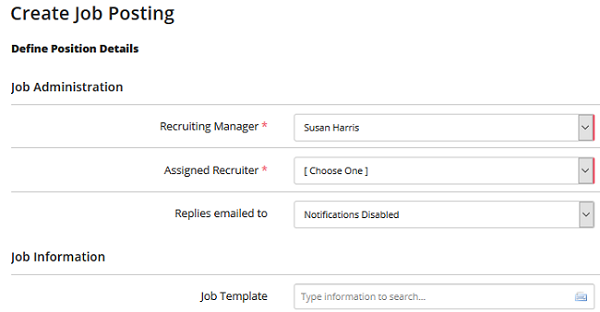
Use this page to create a job posting. You provide details about the position here.
Job Administration
Recruiting Manager Select a recruiting manager. This manager has overall responsibility for the job. This field is not displayed to applicants.
Assigned Recruiter Select a recruiter. This is the job owner directly responsible for finding candidates to fill the job. The recruiter receives the resume responses for the position. This field is not displayed to applicants.
Replies emailed to Select an email address. This address is used to send automatic alerts when a candidate submits a resume to an external job posting.
Job Information
Job Template Job templates are pre-defined job data sets. Selecting a template will populate the job form with the data from the job template. Templates are created and administered by Recruiting Managers and/or Administrators.
Hiring Workflow Select a hiring workflow. The workflow contains the specific hiring stages relevant to the hiring process/position.
Evergreen Job Select whether this is an evergreen job . (Default value is No.)
Internal Job Title The title of the job that is displayed to Rival Recruit users.
Posted Job Title The title of the job that is displayed to applicants. If this field is left blank, the Internal Job Title is displayed to applicants.
Tracking Code This field is your requisition number or Job ID value. If you do not enter a tracking code, the system generates one when the requisition becomes a job posting.
Number of Positions The number of positions associated with this job posting.
Expected Start Date Select a start date for the job. This field is only used when posting to some third-party job boards. It is not posted to Rival Recruit-hosted internal and external job listings sites.
Require eForm Submission Choose to require eForm submission.
Posting Status Indicates whether the job is actively being recruited for and controls which company applicant interfaces the job will be posted to.
Status Change Rules (Available if turned on ) Rival Recruit can now automatically change a job's posting status based on rules that you create here.
Position Type Select the type of position (ex. - Full Time/Regular, Part-Time). This value is displayed to applicants.
Job Level Select the level for the job (ex. Internship, Entry Level, Mid-Career, Executive). This field is used to route the job when posting to third-party internet job boards.
Job Duration The expected length of the assignment. This field is only used when posting to some third-party job boards. It is not posted to the Rival Recruit-hosted internal and external job listings sites.
Location Details
Job Location Code Select a Job Location Code. A location code will populate the City, State, Zip and Country fields. (These location codes are administered by your administrator). As you type, a list of available values are shown. If the Job Location Code values do not appear in your Rival Recruit instance, it is because your administrator did not configure any locations.
Country The country the job posting is based in.
Address Line 1 The street address of this location.
Address Line 2 Additional address information like apartment number, unit number, or suite.
City City the job posting is based in. If this is a regional position, input the closest metropolitan area or your company’s home base. You can indicate in the job description that the position is regional.
State State the job posting is based in. If this is a regional position, input your company’s home base and indicate, in the job description, that the position is regional.
Zip/Postal Code Postal code the job posting is based in. If this is a regional position, input your company’s home base zip code and indicate, in the job description, that the position is regional.
Additional Locations Use this field when posting a job that is hiring for multiple locations. You can assign up to 10 additional locations for the job posting. As you type, a list of available locations are shown. Available locations come from the location codes your administrator set up. Your company locations must include city and state to make the location an available option in this field. If remote job location is turned on and your administrator created remote job locations, they are selectable here.
Compliance
Enable TaxBreak Select Yes or No.
Position Requirements
Travel Select the amount of travel required to perform the job. This field is only used when posting to some third-party job boards. It is not posted to Rival Recruit-hosted internal and external job listings sites.
Per Diem Included? Select whether the position offers a per diem allowance. This field is only used when posting to some third-party job boards. It is not posted to Rival Recruit-hosted internal and external job listings sites.
Salary Minimum The minimum offered salary for the job.
Salary Maximum The maximum offered salary for the job.
Salary Type Select a salary type. This is the frequency in which the job salary is paid.
Salary Currency Select the international currency in which the job salary is paid.
Level of Education Select the minimum acceptable level of education. This field is only used when posting to some third-party job boards. It is not posted to Rival Recruit-hosted internal and external job listings sites.
Years of Experience Enter the number of years of experience required to perform the job. This field is only used when posting to some third-party job boards. It is not posted to Rival Recruit-hosted internal and external job listings sites.
Description/Skills
Job Description The description of the job. There is no character limit on this field. This field accepts HTML tags for advanced text formatting.
Required Skills The required skills for the job. There is no character limit on this field. This field accepts HTML tags for advanced text formatting. (Applicants cannot see this field.)
Required Experience The required experience for this position. There is no character limit on this field. This field accepts HTML tags for advanced text formatting. (Applicants cannot see this field.)
Internal Fields
Internal Notes Enter any notes about the job posting. Only Rival Recruit users can view the internal notes. Applicants cannot view this field.
Internal Skills Enter any notes about the skills required to perform the duties of the job posting. Only Rival Recruit users can view the internal skills. Applicants cannot view this field.
Notes on Position
Enter any notes about this position. (Applicants cannot see this field.)
Custom Fields
Department & Budget Details
Business Unit Select the business unit the job posting should be associated with. Business unit can be displayed on the job listings page for internal and external applicants.
Department Select the department the job posting should be associated with. Department can be displayed on the job listings for internal applicants.
Hiring Manager Select the hiring manager that requisitioned the job posting. The name of the hiring manager can be displayed on the job listings for internal applicants. Selecting a hiring manager here does not grant access for them to view the candidates for the job posting.
Industry Select the most appropriate industry for your company. This field is only used when posting to some third-party job boards. It is not posted to Rival Recruit-hosted internal and external job listings sites.
Business Function Select the most appropriate business function for the job posting. The business function should correspond to the type of work that the position involves. This field is only used when posting to some third-party job boards. It is not posted to Rival Recruit-hosted internal and external job listings sites.
Budgeted Salary Enter the budgeted salary for the job posting. This field accepts numeric characters only. It is not posted to Rival Recruit-hosted internal and external job listings sites.
Budget Currency Select the international currency in which the job salary is paid.
Budgeted Quarter Select the budgeted quarter for the job posting. This field accepts numeric characters only. It is not posted to Rival Recruit-hosted internal and external job listings sites.
Budgeted Year Select the budgeted year for the job posting.
Fee Agency
Priority Settings
Time Measurement The overall time frame measurement can be defined in terms of days , weeks or months using the drop-down menu.
Set time frame Set the High priority field for the number of days it will take a position to become high priority. These jobs will have a red indicator.
Job Category
Content recovered from the legacy Help Center on 2026-09-14 and not yet reviewed against the current product. Source: https://srt-recruiting-help.silkroad.com/#/home/34163/en/std