ROSI Copilot
ROSI Copilot provides in-product guidance in Recruit, helping users quickly find information and understand how to use features. As part of ROSI (Rival OS Intelligence), Copilot allows you to ask questions in natural language and receive immediate, context-aware guidance while working in the product. In Recruit, ROSI’s primary value comes from AI-powered features embedded across workflows. Copilot complements these features by helping you navigate the product and complete tasks more efficiently. Using ROSI Copilot When enabled, ROSI Copilot is available directly within Recruit. You can ask questions in plain language—such as how to complete a task, where to find a setting, or what a feature does—and receive immediate guidance. ROSI can help you:
Example questions When you first open ROSI Copilot, suggested questions are displayed to help you get started:
You can click any suggested question or type your own in the Ask me anything! field. What to expect
Enablement: Administrators can turn ROSI Copilot on or off in Administration > Settings > ROSI Features > ROSI Copilot. For step-by-step instructions, see Enable or Disable ROSI Copilot. ROSI availability and capabilities depend on your organization’s configuration. Some features may be disabled by default to support controlled rollouts and AI governance. Providing feedback Your feedback helps improve ROSI over time. You can rate your experience and share comments directly within the ROSI chat window.
Ending a chat session To end your current ROSI Copilot session, click the X in the top-right corner of the chat window. A confirmation dialog appears asking "Are you sure you want to end the current chat session?" Click End Chat to close the session, or Cancel to continue your conversation. Ending a chat session clears the current conversation. The next time you open ROSI Copilot, a new session begins with the default suggested questions. | 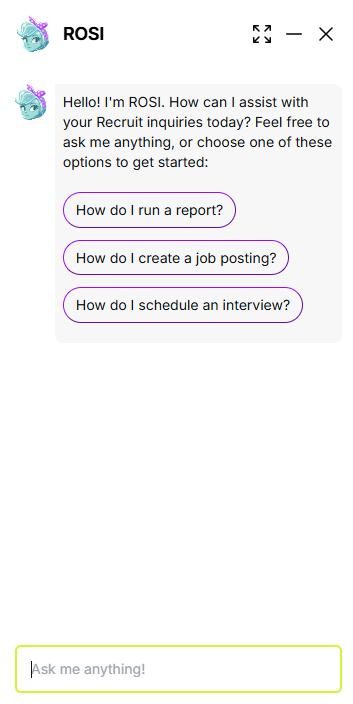 |