ROSI Job Descriptions
Creating job descriptions for job postings or requisitions can be time consuming. ROSI Job Descriptions helps generate key content—job description, required skills, and required experience—in seconds.
Walk through our Guided Demo for a quick overview.
How it works
- ROSI generates content based on selected fields and company-defined inputs
- Generated content is available when creating or editing job templates and requisitions
- You can edit or regenerate content at any time
Enablement and settings
Administrators can manage ROSI Job Descriptions in Administration > Settings > ROSI Features > ROSI Job Descriptions. Administrators can:
Company Values can include themes such as diversity and inclusion, remote work, collaboration, or innovation. | 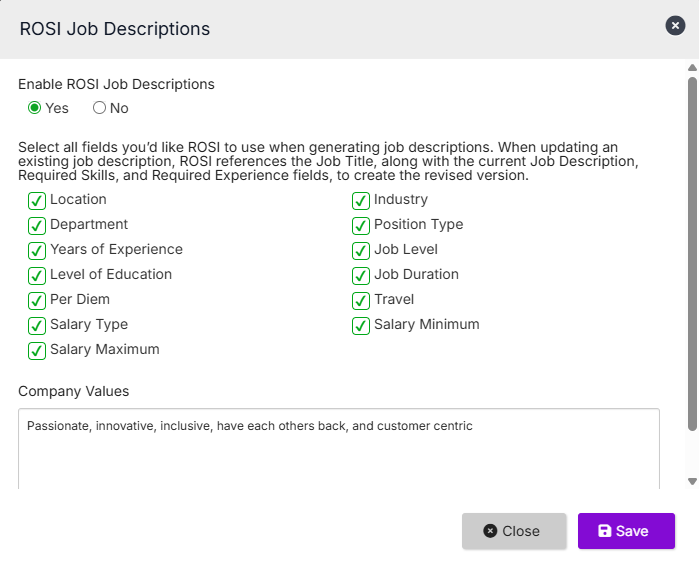 |
Create and refine job descriptions with ROSI
Create a job template with ROSI
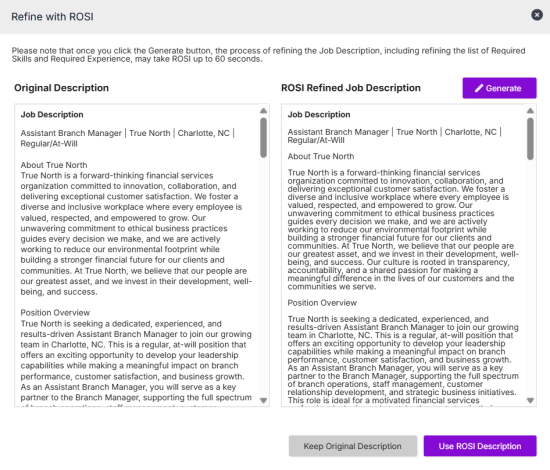
Refine an existing job description Already have a job description? ROSI can help improve clarity, tone, and completeness while preserving your original content.
|  |
What to expect
- ROSI-generated content is a starting point — you can fully edit it before saving
- Output is influenced by the fields you complete and the Company Values defined by your administrator
- The more information you provide, the more relevant and accurate the generated content will be
- You can regenerate content as many times as needed before saving
- Feature availability depends on your organization’s settings and user access