User permissions
Roles do most of the heavy lifting in Rival Recruit, but additional permissions can be granted to users to expand or restrict their capabilities.
Administrators and recruiting managers assign these user permissions on a user's Users Account page.
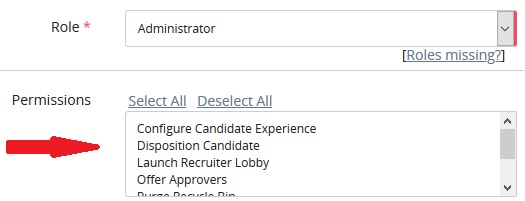
| Permission | Description |
|---|---|
| Activate Jobs | Allows an admin, recruiter manager, or recruiter to activate jobs. |
| Configure Candidate Experience | Allows user to configure Candidate Experience (if implemented) |
| Create Job Posting | Allows user to create job postings |
| Deactivate Jobs | Allows an admin, recruiter manager, or recruiter to deactivate jobs |
| Disposition Candidate | Allows user to disposition candidates |
| Edit Requisition Approval | Allows a user to edit a requisition approval |
| Export Fee Agency Search Results | Allows user to export fee agency search results |
| Export Job Search Results | Allows user to export job search results |
| Export Resume Search Results | Allows user to export resume (candidate) search results |
| Initiate Onboarding | Allows user to send to Rival Workflow (if implemented) |
| Manage Report Access | Turns on the Manage Report Access menu option so that the user can manage the reports that a role can access |
| Modify Hiree Information | Allows the user to modify hiree information (Modify Hiree Information link available on candidate profile) |
| Modify Offer Information | Allows the user to modify offer information (Modify Offer Information link available on candidate profile) |
| Offer Approvals | Allows user to approve offers |
| Participate in conversations with candidates | Allows user to view and send text messages using the texting feature. Also enables the inbox icon in the header. |
| Purge Recycle Bin | Allows user to purge the recycle bin |
| Requisition Approvals | Allows user to approve requisitions |
| Remove disposition | Allows user to remove a candidate's disposition |
| Settings Access | Allow access to the Settings tile where you can set various Rival Recruit settings |
| Source Passive Candidates | Turns on the source passive candidates feature for the users. |
| View conversations with candidates | Allows user to view but not send text messages using the texting feature. |