Hiring Insights
The new Hiring Insights dashboard provides a comprehensive overview of your hiring pipeline, offering valuable insights to track key metrics, identify trends, and optimize recruitment strategies for better outcomes.
Note: Hiring Insights is available based on your user profile's tier assignment, to users with Reporting Tier levels 2 & 3.
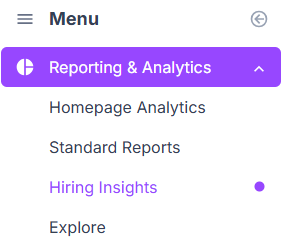
Hiring Insights can be found under Reporting & Analytics in the left-hand menu, or in the drop-down menu next to Standard Reports.
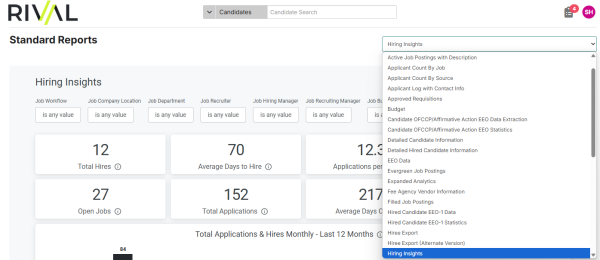
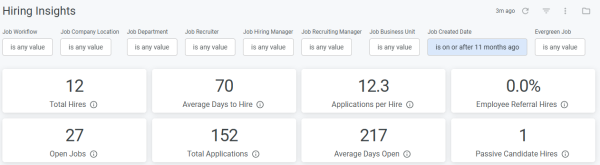
The dashboard data can be filtered by Job Workflow, Company Location, Department, Recruiter, Hiring Manager, Recruiting Manager, and Business Unit. The date range of data included can also be specified by Job Created Date and Evergreen Jobs.
Summary tiles show at-a-glance Total Hires, Average days to Hire, Applications per Hire, Open Jobs, Total Applications, Average Days Open, as well as Employee Referrals and Passive Candidate Hires.
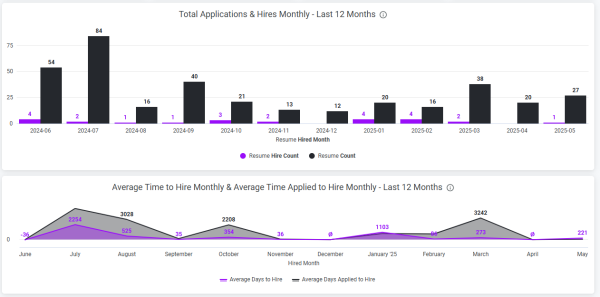
Graphs below show Monthly comparison of Total Applications vs. Hires, and Monthly Average Time to Hire & Average Time Applied to Hire.
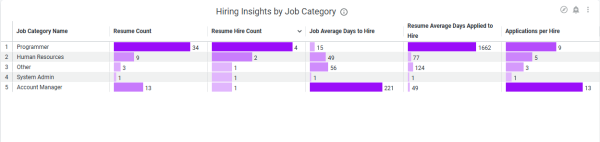
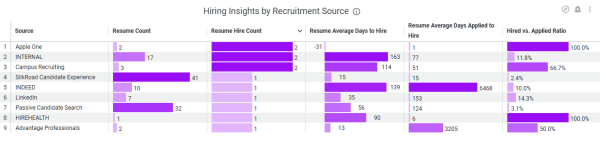
Further data breakdown show the data by Job Category, Location, Recruiter, and Recruitment Source.