ROSI Skills Match
ROSI Skills Match uses AI to evaluate how well a candidate's skills align with the requirements of a job. The system automatically extracts skills from both the job description and candidate resumes, compares them, and produces a transparent, weighted match score — helping recruiters and hiring managers identify top candidates without manual resume screening.
Note: ROSI Skills Match replaces the legacy Hot Match system with a more accurate, explainable, and customizable approach to candidate matching. When Skills Match is enabled, the Hot Match page is hidden.
How it works
ROSI Skills Match appears on the Job Posting Details page. When you navigate to a job, the system automatically:
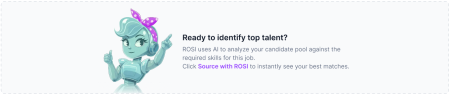
- Extracts skills from the job description — AI identifies up to 15 key skills required for the role, normalized against a standardized skills database.
- Extracts skills from candidate resumes — A background process extracts up to 30 skills from each candidate's resume using a combination of exact database matching and AI inference. This runs automatically every 15 minutes.
- Compares and scores — The system compares job skills against candidate skills and calculates a weighted match score based on skill categories.
Match Score
The Match Score is a percentage representing how well a candidate's skills align with the job requirements. Scores are calculated using a weighted point system based on skill categories:
- Core (must-have) — 6 points per matched skill
- Preferred (important, but not required) — 3 points per matched skill
- Bonus (nice-to-have) — 1 point per matched skill
A candidate's score is the percentage of total possible points earned based on which skills they match. Scores are rounded to whole numbers.
Skills Match results
The Skills Match section on the Job Posting Details page displays up to 45 top-matched candidates, sorted by highest match score. Candidates are labeled by source:
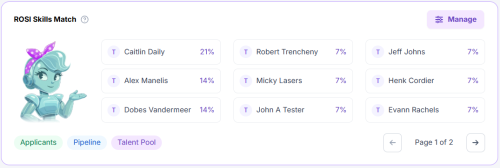
- Applicants — Candidates who applied to the job.
- Pipeline — Candidates imported or sourced and linked to the job.
- Talent Pool — All candidates in the system with extracted skills.

From the results, you can:
- Filter results by candidate pool (Applicants, Pipeline, Talent Pool)
- Click a candidate's name to open their Candidate Resume Profile (CRP)
- Click a candidate's percentage score to view a detailed skill-by-skill breakdown showing matched skills and unmatched skills
- Open Manage Skills to refine the skills used for matching
Candidate Match Details
Clicking a candidate's match score opens a detailed modal showing:
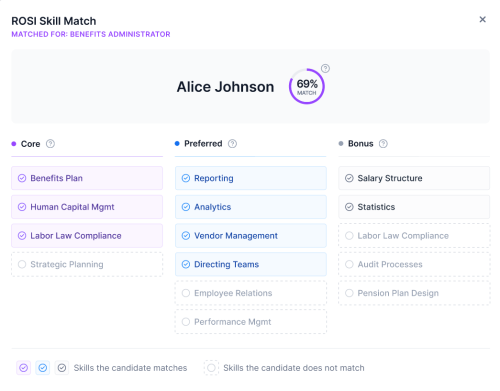
- The candidate's overall match percentage
- Which job skills are matched (highlighted in green)
- Which job skills are unmatched (gaps)
- Explanation text describing what the score represents and how matched skills contribute
The Skills Match score is also visible on the candidate's CRP page when the candidate is linked to a job.
Manage Skills
You can refine how candidates are evaluated using the Manage Skills interface. ROSI initially extracts up to 15 skills from the job description. You can then:
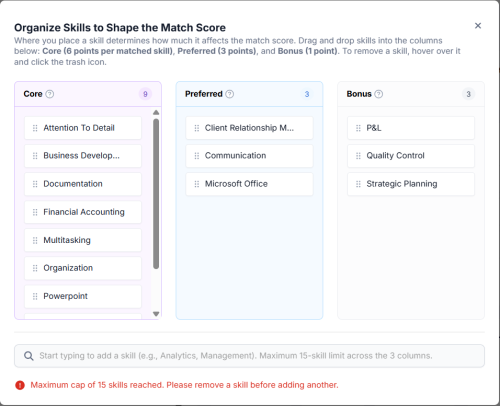
- Add skills — Search and add skills from the standardized skills database.
- Remove skills — Remove skills that are not relevant to the role.
- Categorize skills — Assign each skill to Core, Preferred, or Bonus. This directly impacts the weighted scoring.
- Reorder skills — Arrange skills to reflect role priorities.
There is a maximum of 15 skills total across all three categories. If you reach the limit, remove a skill before adding another. Drag and drop skills between columns to reclassify them.
Note: Results are dynamically updated when job skills are modified. Skills are displayed in title case throughout the interface.
Key information
- ROSI Skills Match is available for all clients. To enable it, an administrator navigates to Administration > Settings > ROSI Features and enables ROSI Skills Match. When enabled, the legacy Hot Match page is hidden.
- Skills extraction from job descriptions is automatic — it runs on page load with no manual action required.
- Resume skills extraction runs as a background process (every 15 minutes) and does not require user action.
- Up to 45 top-matched candidates are returned, sorted by score.
- Deleted candidates and candidates you do not have permission to access are automatically excluded from results.
- Skills Match currently provides a binary match (skill present or not) — it does not factor in years of experience, recency of usage, or proficiency level.
- When skills are first extracted from a job description, they are all placed in the Core category by default. Review and reclassify skills using Manage Skills to ensure scoring reflects your priorities.
Enable or disable ROSI Skills Match
ROSI Skills Match is not enabled by default. An administrator must turn it on for your organization:
- Navigate to Administration > Settings > ROSI Features.
- Locate the ROSI Skills Match toggle.
- Toggle it to Enabled and click Save.
When enabled, the Skills Match section appears on all Job Posting Details pages and the Hot Match page is hidden.
To disable, return to the same setting and toggle it off. When disabled, Skills Match is hidden from all Job Posting Details pages and Hot Match is restored.
Known limitations
- Adding custom skills that do not exist in the standardized skills database is not supported. Highly niche or specialized skills may not appear in suggestions.
- Skills matching does not factor in years of experience, recency of skill usage, or proficiency level.
- ROSI Skills Match is not enabled by default — an administrator must turn it on in Settings > ROSI Features.