Help CenterRecruitReporting & AnalyticsReporting & Analytics overviewQuick look: Reporting & Analytics UI
Tile actions
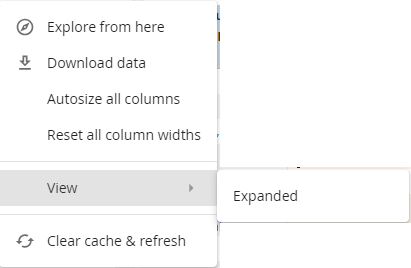
Tile actions are available when you click  on a tile.
Tip: Action options are controlled by the tier assigned to your user profile.
| This action: | Does this: |
|---|---|
| Explore from here | Opens Explore so you can explore report data in depth. |
| Download data | Download report data into a format you select. From the dashboard menu, click and select Download. |
| Autosize All Columns | To autosize columns, from the tile menu, click and select Autosize all columns. |
| Reset All Column Widths | If you resized columns, reset sets them back to their original sizes. From the tile menu, click and select Reset all column widths. |
| View Expanded | View the report in a pop-up with expanded columns. From the tile menu, click and select View>Expanded. |
| Clear cache & refresh | Clears the cache and refreshes the data. |