Profile
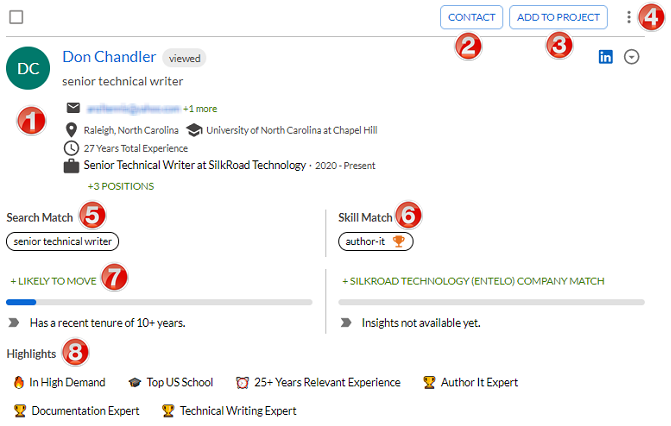
A profile is a summary view of a candidate’s career history, skill level, key achievements, career progression, likeliness to move, social footprint, and more. It’s an essential component of the system because it contains the information you need to source candidates.
Here are some key elements of a profile.
| Name | Description | |
|---|---|---|
| 1 | Candidate information | Shows candidate name, contact info, city, university, years of experience, and more. Action tags show actions performed on a profile. Examples: Tip: Hovering over an action tag shows when the action occurred and by whom. |
| 2 | Contact button | Opens the Contact window so you can email the candidate. |
| 3 | Add to Project button | Opens the Projects window so you can add the candidate to a project. |
| 4 | Action button | Opens the Action menu so you can view candidate's email addresses, set reminders, report profile (duplicate profile or incorrect info), request additional email, and export profile to other integrated systems. |
| 5 | Search match | Shows matches to your search query. |
| 6 | Skills match | Shows matches to the skills criteria from your search query. |
| 7 | Likely to move | Uses predictive variables and advanced machine learning to predict which candidates are most likely to be open to a new opportunity. Learn more here. |
| 8 | Highlights | Highlights aspects of candidate such as education, career achievements, and more. Learn more here. |
