Help CenterRecruitReporting & AnalyticsReporting & Analytics overviewQuick look: Reporting & Analytics UI
Column actions
Column actions are available when you click  on a column heading.
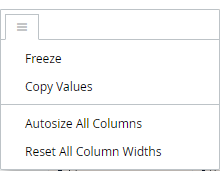
| This action: | Does this: |
|---|---|
| Freeze | Freezes a table column to the left side of the chart. The frozen column remains visible on the left side during horizontal scrolling. Tip: Click Unfreeze to turn off freezing. |
| Copy Values | Copies the column header and all the values in the column, which can then be pasted into a spreadsheet, text file, or Looker filter. |
| Autosize All Columns | Autosizes all columns based on its longest data value. |
| Reset All Column Widths | Resets all column widths to their original size. |