ROSI
ROSI (Rival OS Intelligence) is an AI-powered Knowledge Agent that helps admins, managers, and employees get quick answers and move faster in Perform. ROSI can provide in-product guidance and link you to relevant Help Center topics—and, depending on your role, it can also surface helpful information from Perform while respecting role-based permissions.
Perform also includes ROSI Review Writer, which helps managers and employees generate draft review content using available performance information. Review Writer provides a structured starting point that you can refine before submitting.
Behind the scenes, ROSI uses existing Rival services and APIs to return up-to-date results based on your question. Responses reflect current data and respect your role-based permissions.
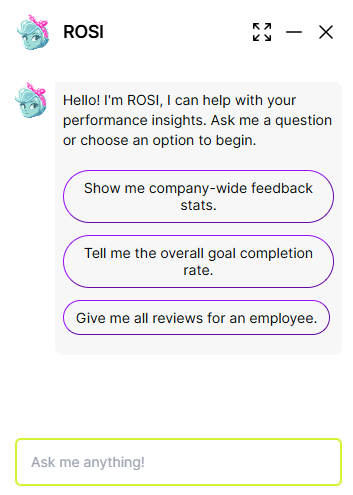
Ask ROSI
- At the bottom right corner of the page, click the ROSI icon.
- Select an existing question or enter your question in the Ask me anything box.
- Review the response. If helpful content is available, ROSI may include a link to the source topic in the Help Center.
Turn ROSI on or off
ROSI availability is controlled by your organization. If you have access, you can enable or disable ROSI from Settings.
- From the navigation bar, click Administration.
- Under System Management, click Enable Apps .
- Toggle ROSI Enabled on or off to enable ROSI admin to access your performance data (permissions respected). Toggle ROSI Review Writer Enabled to enable managers and employees.
Provide feedback
You can rate ROSI responses and submit feedback. Rival reviews this feedback to improve the experience.
- After you ask ROSI a question, click the feedback option
 , then select Feedback.
 - Select a rating, add comments if desired, and submit.