Goals page
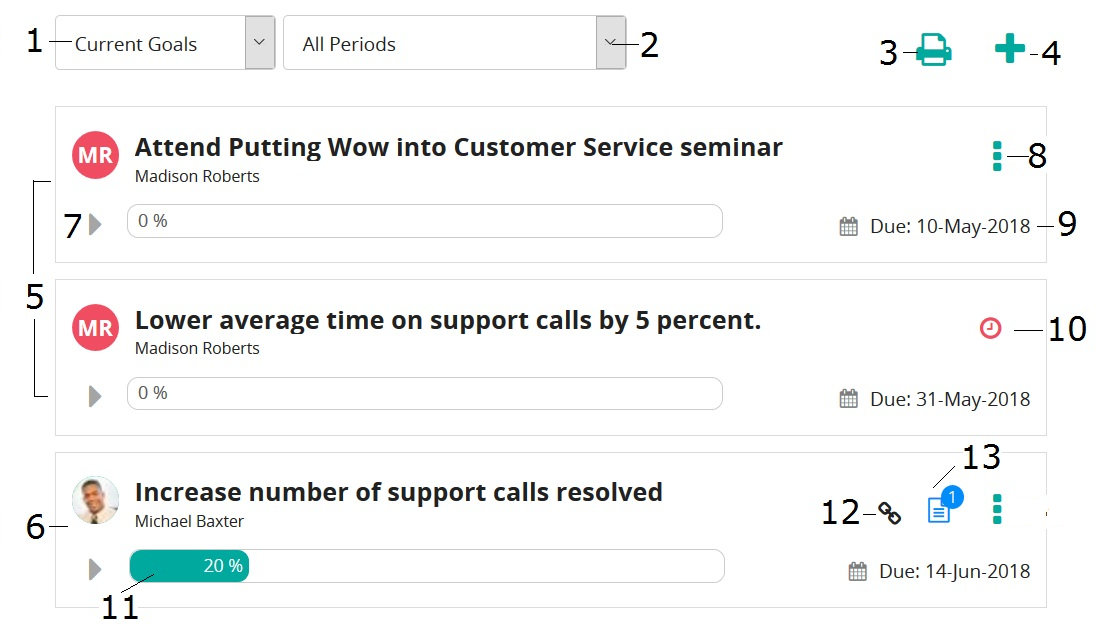
Use this page to work with current, completed, and deleted goals.
| Item | Description | |
|---|---|---|
| 1 | Goals filter | Filters this page to show current, complete, or deleted goals. Upon access, current goals are shown by default. |
| 2 | Goal period filter | Filters this page to show goals associated with a specific goal period. Upon access, all goals periods are shown by default. |
| 3 | Print button | Prints the goals list (this page). |
| 4 | Create New Goal button | Opens the Create New Goal page so you can create a new goal. |
| 5 | Employee-created goals | These are goals you created. You can tell because your avatar and name are shown. When expanded, if your manager is required to approve the goal and they approved it, their avatar appears on the right along with the approval date. If not approved yet, you'll see a red clock icon. If approval is not required, there is no red clock icon. |
| 6 | Manager-assigned goal (Team goal) | This is a manager-assigned goal (team goal). You can easily identify because your manager's avatar appears on the left and your avatar (along with other team members) follows the Assigned To label when goal is expanded. |
| 7 | Expand/Contract button | Expand to see goal details (goal description and whether it's approved). Contract to hide goal detail. |
| 8 | Actions button | Click to select an action: edit, complete, or delete a goal. |
| 9 | Due date | Indicates when the goal is due. (Red date indicates goal is overdue.) |
| 10 | Waiting for approval | If the goal required manager approval (depends on how the goal period was set up), this icon indicates manager has not approved the goal yet. |
| 11 | Progress bar | Shows the progress you've made on the goal (in percentage). |
| 12 | Corporate objective | Indicates goal is linked to a corporate objective. Hover over it to see corporate objective. |
| 13 | Comments | Indicates goal has comments. |
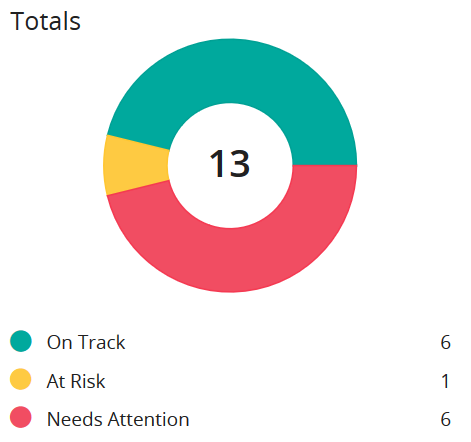
This page also has a chart, which shows the number of goals that are:
- On Track: Due date is more than two weeks away
- At Risk: Due date is two weeks away
- Needs Attention: Due date is one week away or past due