eForm Builder
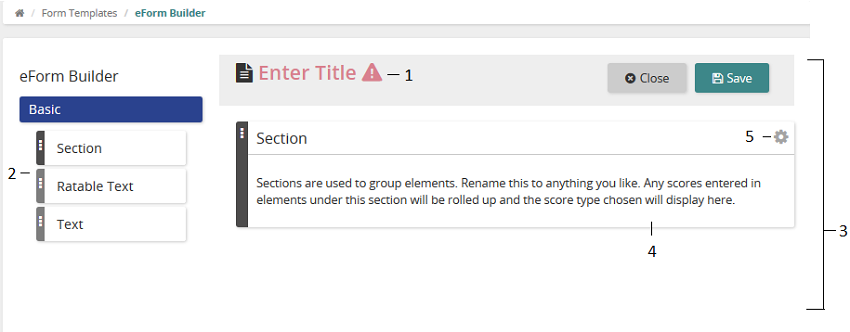
Use the eForm Builder to create or change a form template (eForm).
| Name | Description | |
|---|---|---|
| 1 | Title | On a new eForm, enter a title. On an existing eForm, the title appears here. |
| 2 | Basic elements | Fundamental elements that are part of a typical eForm. Basic elements are Section, Ratable Text, and Text. |
| 3 | Content panel | Shows the eForm's content. eForm header title appears at the top followed by eForm contents. |
| 4 | Selected elements | Elements that you selected appear here and will appear on the eForm. |
| 5 |  (gear icon) (gear icon) | Click to edit element properties. Edit options vary based on element type. Some typical Edit options include Edit Properties, Edit Rating Scales, and Delete. |