Review Form page
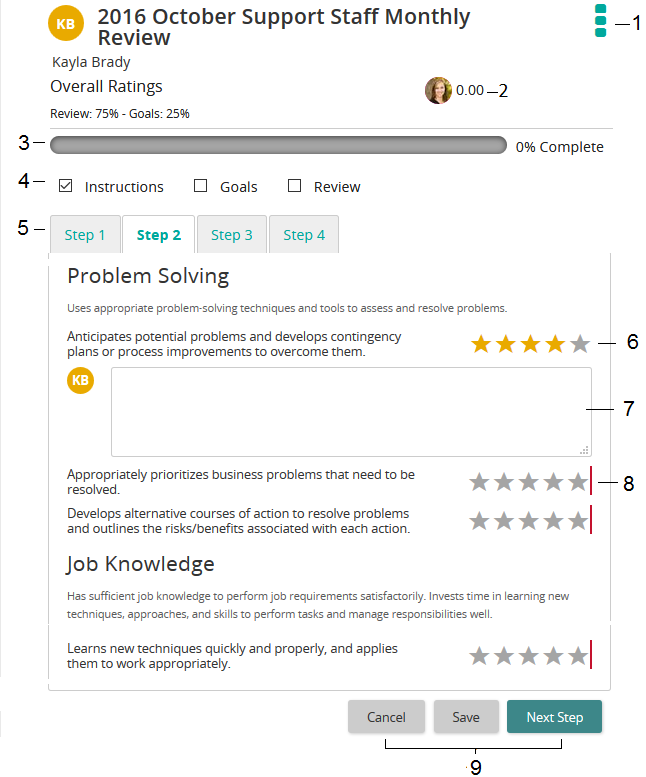
The Review Form page is the actual review. Use this page to complete your review.
Tip: Your review form will likely look different. The form above is a sample.
| Item | Description | |
|---|---|---|
| 1 | Actions button | Click to view/print the review. |
| 2 | Rollup | If the review is set up to display rollup text or decimal numbers, it appears here. |
| 3 | Progress bar | Displays your progress in completing the review. |
| 4 | Check boxes | Indicates where you are on the Review form. A check indicates you have completed actions on a specific tab. |
| 5 | Tabs | Provides a sequential way of completing a review. Click a tab to complete actions such as viewing review instructions, dealing with goals, completing review, and submitting review. Tip: Your tabs may be labeled differently than sample screen. It depends on how your administrator set them up. |
| 6 | Rating | Star slider or drop-down box |
| 7 | Comment box | You can enter text here. |
| 8 | Red bar | Indicates a required field/response. |
| 9 | Command buttons | Cancel: Cancels changes you made and does not save. Save: Saves the entries you made. Next Step: Advances to the next tab. |