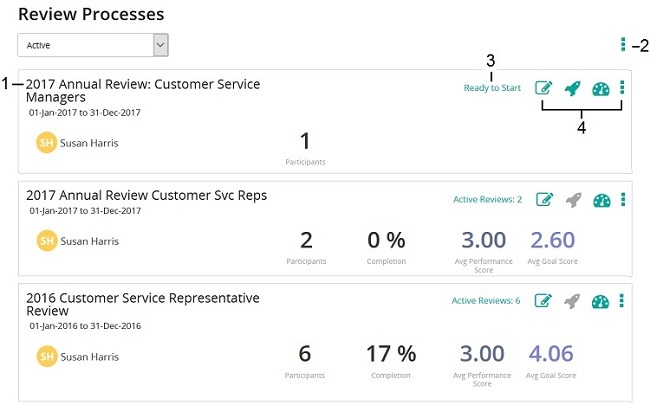
Opens the Review Processes Setup wizard so you can make some changes or complete a review's setup. Opens the Review Processes Setup wizard so you can make some changes or complete a review's setup.
 Starts reviews for the assigned reviewees. The number indicates number of reviewees. (Tip: If you add additional reviewees after review starts, click StartReviews again for those reviewees.) Starts reviews for the assigned reviewees. The number indicates number of reviewees. (Tip: If you add additional reviewees after review starts, click StartReviews again for those reviewees.)
 Opens the Reviews dashboard so you can monitor and track a review's progress. Opens the Reviews dashboard so you can monitor and track a review's progress.
 Shows additional options: Shows additional options:
- Unlock Process: Open the review process for editing so that you can make any changes to the review process. Tip: If the review process had any soft deleted data, a message alerts you that proceeding permanently deletes that data from the database.
- Delete: Deletes the review process.
- Export to CSV: Exports to a comma separated values file.
- Resume review process for all: Resumes review process for all reviews in the process after a calibration pause.
|